A token is a marker in text that eKasa replaces with formatted text, a barcode or QR code, a logo or a page break when printing. This is how you add, for example, a bold heading or a QR code linking to a review page to the header, footer or a non-fiscal receipt.
Why tokens
eKasa prints on very different devices. An external printer receives ESC/POS commands, an electronic receipt is rendered as a PDF, and the built-in printers of Sunmi, PAX and Ingenico payment terminals are driven through their manufacturers’ libraries (SDKs). Each device expresses bold text, a barcode or a paper cut differently.
Tokens are therefore a single, device-independent notation. Your software writes a token once and eKasa translates it into the language of the actual printer when printing: ESC/POS commands, a PDF, or terminal SDK calls. You do not need to know the commands of individual printers, and the same text prints on every supported device.
Tokens
text Formatted textBold, underlined, double height, inverted printing and alignment.
barcode BarcodeEAN-8, EAN-13, Code 128, Code 39 and Code 93.
qr QR codeA link or any text as a QR code.
logo LogoA logo stored in the printer memory.
pagebreak Page breakPaper cut or a new PDF page.
Where tokens work
| Text | Property | Page break |
|---|---|---|
| non-fiscal receipt | text |
yes |
| receipt footer | footerText |
yes |
| receipt header | headerText |
ignored |
| item description | description |
ignored |
The length of the header, footer and item description is not limited. The text, however, must not contain control
characters other than SUB, RS, US, CR and LF. For example, eKasa rejects a tab with error
-900 ValidationError.
How a token is printed depends on the printer:
| Token | External printer (pos) |
Sunmi, PAX, Ingenico terminal | PDF and e-mail |
|---|---|---|---|
text |
yes | yes | yes, without double width |
barcode |
yes | yes, Ingenico Code 128 only | yes, without text under the code |
qr |
yes | yes | yes |
logo |
yes | no | no |
pagebreak |
yes | yes | yes |
A token the printer does not support is skipped and the rest of the text is printed.
Token structure
A token starts and ends with the control character SUB. The opening SUB is followed by the token identifier and then the parameters. Each parameter starts with RS; US separates the key from the value.
- Identifiers and keys must be written exactly as in this article (
pagebreak,hriPosition). They are case-sensitive. - Values can be given by name or number (
centeror1); they are not case-sensitive. - Parameter order does not matter. Optional parameters can be left out.
- An unknown or invalid token is not printed; the text around it is printed as usual. If the closing SUB is missing, the rest of the text after the token is not printed.
Control characters
Token notation uses markers for readability. In the real text, replace them with characters:
| Marker | Character | In JSON and C# |
|---|---|---|
| SUB | 0x1A |
\u001a |
| RS | 0x1E |
\u001e |
| US | 0x1F |
\u001f |
| LF | 0x0A, line feed |
\n |
| CR | 0x0D, carriage return |
\r |
In the HTTP API and the .NET library
In JSON, write the control characters as \u001a, \u001e and \u001f. For example, a bold heading and a QR code
in a non-fiscal receipt:
POST {server_address}/api/v1/printers/print{
"text": "\u001atext\u001econtent\u001fObjednávka č. 42\u001eformat\u001f1\u001a\n\u001aqr\u001econtent\u001fhttps://ekasa.ninedigit.sk\u001a",
"contentFlags": []
}With the library you do not write control characters. Each token has a class whose ToString() returns the finished
token:
var sb = new StringBuilder();
sb.AppendLine(TextToken.Create("Objednávka č. 42", TextFormats.Bold).ToString());
sb.AppendLine(QrCodeToken.Create("https://ekasa.ninedigit.sk").ToString());

var context = new TextPrintContext(sb.ToString(), NonfiscalReceiptContentFlags.None);
PrintResult result = await client.PrintTextAsync(context, cancellationToken);
Formatted text (text)
Prints text with formatting and alignment. The text is always on its own line; no CRLF is needed after it.
| Parameter | Required | Values | Default |
|---|---|---|---|
content |
yes | text, may contain a line feed LF | |
format |
no | sum of the values in the table below | 0 |
alignment |
no | left (0), center (1), right (2) |
left |
Combine formats by adding the values. For example, 3 = bold (1) + underlined (2).
| Value | Format |
|---|---|
0 |
no formatting |
1 |
bold |
2 |
underlined |
4 |
double width |
8 |
double height |
16 |
inverted (white text on black) |
With double width, only half as many characters fit on a line. Find the number of characters per line in Printer info; otherwise the text may wrap unexpectedly.
Notation: SUBtextRScontentUSCentredRSalignmentUScenterSUB
"\u001atext\u001econtent\u001fBold and underlined\u001eformat\u001f3\u001ealignment\u001fcenter\u001a"string token = TextToken.Create(
"Bold and underlined",
TextFormats.Bold | TextFormats.Underlined,
TextAlignment.Center).ToString();Example
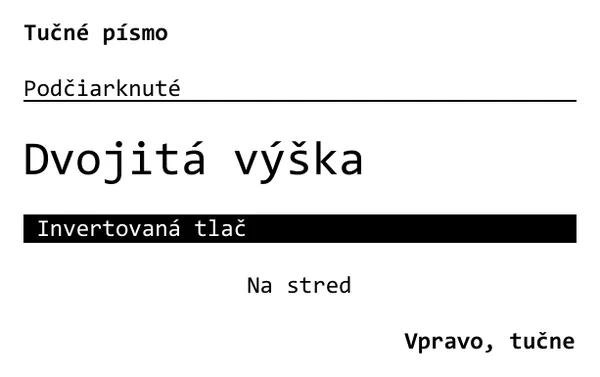
POST {server_address}/api/v1/printers/print

{
  "text": "\u001atext\u001econtent\u001fTučné písmo\u001eformat\u001f1\u001a\n\u001atext\u001econtent\u001fPodčiarknuté\u001eformat\u001f2\u001a\n\u001atext\u001econtent\u001fDvojitá výška\u001eformat\u001f8\u001a\n\u001atext\u001econtent\u001f Invertovaná tlač \u001eformat\u001f16\u001a\n\u001atext\u001econtent\u001fNa stred\u001ealignment\u001fcenter\u001a\n\u001atext\u001econtent\u001fVpravo, tučne\u001eformat\u001f1\u001ealignment\u001fright\u001a",
  "contentFlags": []
}
Barcode (barcode)
| Parameter | Required | Values | Default |
|---|---|---|---|
type |
yes | ean8, ean13, code128, code39, code93 |
|
content |
yes | the code content, see the rules below | |
height |
no | height in printer dots, 1 to 255 | 60 (about 7.5 mm) |
hriPosition |
no | text below or above the code: none (0), above (1), below (2), both (3) |
none |
elementWidth |
no | bar width from 1 (narrowest) to 6 (widest) |
3 |
Code content:
- EAN-13: 12 digits; eKasa adds the check digit. If you give 13 digits, the last one must be a valid check digit.
- EAN-8: 7 digits, or 8 with a valid check digit.
- Code 128, Code 39, Code 93: ASCII characters only, no diacritics.
Invalid content makes printing fail (see Token not printed).
hriPosition and elementWidth apply only to the external printer (pos). Narrower bars (1, 2) fit more
characters into the code, but older printers may not support them. With height 0 the code is not printed.
Notation: SUBbarcodeRStypeUSean13RScontentUS858123456789RShriPositionUSbelowSUB
"\u001abarcode\u001etype\u001fean13\u001econtent\u001f858123456789\u001ehriPosition\u001fbelow\u001a"string ean = BarcodeToken.Create(
"858123456789", BarcodeType.EAN13, BarcodeHriPosition.Below).ToString();
string code128 = BarcodeToken.Create(
"OBJ-2026-0042", BarcodeType.Code128, height: 80).ToString();Example
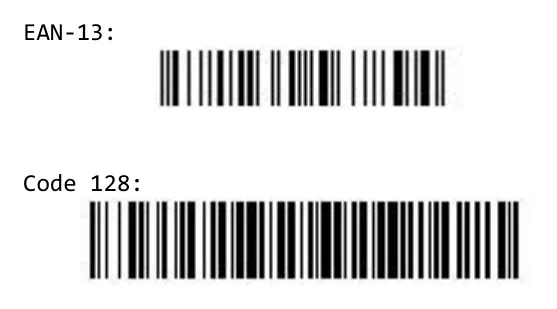
POST {server_address}/api/v1/printers/print

{
  "text": "EAN-13:\n\u001abarcode\u001etype\u001fean13\u001econtent\u001f858123456789\u001a\n\nCode 128:\n\u001abarcode\u001etype\u001fcode128\u001econtent\u001fOBJ-2026-0042\u001eheight\u001f80\u001a",
  "contentFlags": []
}
QR code (qr)
| Parameter | Required | Values | Default |
|---|---|---|---|
content |
yes | QR code content, for example a web address | |
alignment |
no | left (0), center (1), right (2) |
center |
Notation: SUBqrRScontentUShttps://ekasa.ninedigit.skSUB
"\u001aqr\u001econtent\u001fhttps://ekasa.ninedigit.sk\u001a"string qr = QrCodeToken.Create("https://ekasa.ninedigit.sk").ToString();Example
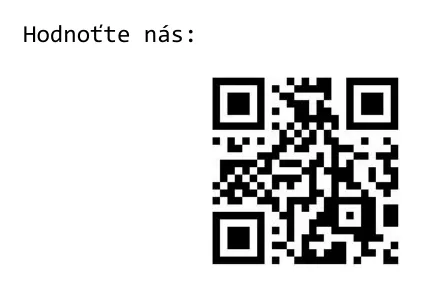
POST {server_address}/api/v1/printers/print

{
  "text": "Hodnoťte nás:\n\u001aqr\u001econtent\u001fhttps://ekasa.ninedigit.sk\u001a",
  "contentFlags": []
}
Logo (logo)
Prints a logo stored in the printer memory. It works only on the external printer (pos); upload the logo with the
printer manufacturer’s tool.
| Parameter | Required | Values | Default |
|---|---|---|---|
address |
no | position of the logo in the printer memory | 1 |
size |
no | normal (0), doublewidth (1), doubleheight (2), quadruple (3, double width and height) |
normal |
alignment |
no | left (0), center (1), right (2) |
center |
Notation: SUBlogoRSaddressUS1RSsizeUSquadrupleSUB
"\u001alogo\u001eaddress\u001f1\u001esize\u001fquadruple\u001a"string logo = LogoToken.Create(1, LogoSize.Quadruple).ToString();Page break (pagebreak)
On a paper receipt the printer cuts the paper (a printer without a cutter only feeds it); in a PDF the text continues on a new page. The token has no parameters.
A page break works in a non-fiscal receipt and in the receipt footer. In the header and in an item description it is ignored so that it does not split the receipt.
Notation: SUBpagebreakSUB
"Objednávka pre kuchyňu\nStôl 5: 2x Káva\n\u001apagebreak\u001a\nObjednávka pre bar\nStôl 5: 1x Džús"string pageBreak = new PageBreakToken().ToString();Example
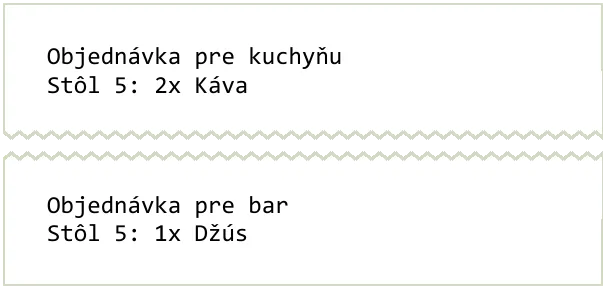
POST {server_address}/api/v1/printers/print

{
  "text": "Objednávka pre kuchyňu\nStôl 5: 2x Káva\n\u001apagebreak\u001a\nObjednávka pre bar\nStôl 5: 1x Džús",
  "contentFlags": []
}
Examples from practice
Tokens are most often used in the receipt footer and in an item description. The examples are complete receipt registration requests; the pictures were produced exactly from them.
Thanks and a review QR code in the footer
A bold, centred thank-you and below it a QR code linking to a review page for the shop. The QR code in the example leads to this article.
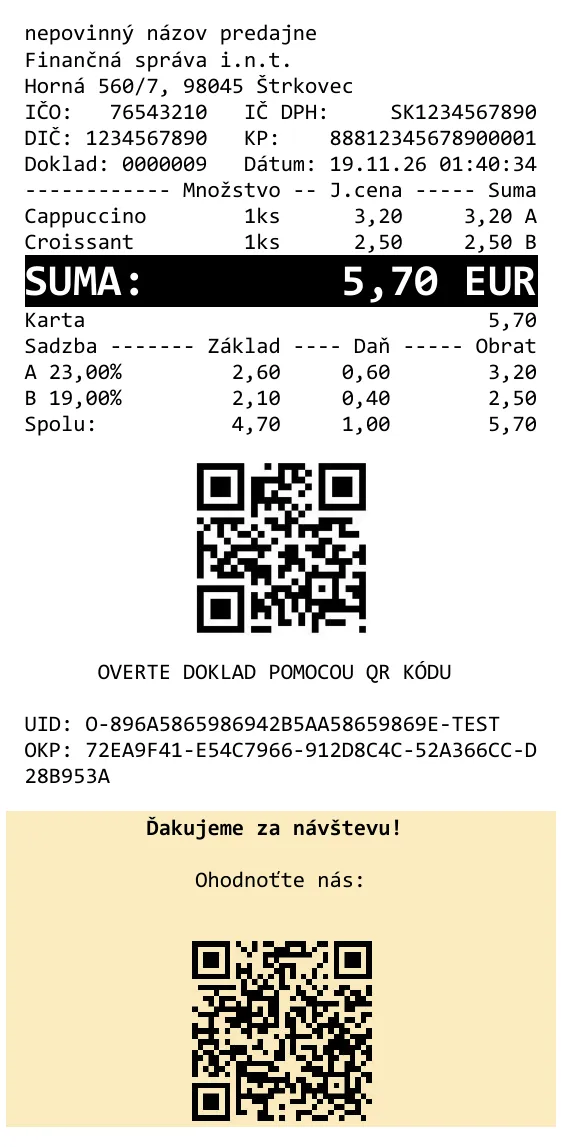
POST {server_address}/api/v1/requests/receipts/cash_register

{
  "print": {
    "printerName": "pdf"
  },
  "request": {
    "data": {
      "cashRegisterCode": "88812345678900001",
      "items": [
        {
          "type": "positive",
          "name": "Cappuccino",
          "quantity": {
            "amount": 1,
            "unit": "ks"
          },
          "unitPrice": 3.2,
          "price": 3.2,
          "vatRate": 23
        },
        {
          "type": "positive",
          "name": "Croissant",
          "quantity": {
            "amount": 1,
            "unit": "ks"
          },
          "unitPrice": 2.5,
          "price": 2.5,
          "vatRate": 19
        }
      ],
      "footerText": "\u001atext\u001econtent\u001fĎakujeme za návštevu!\u001eformat\u001f1\u001ealignment\u001fcenter\u001a\n\u001atext\u001econtent\u001fOhodnoťte nás:\u001ealignment\u001fcenter\u001a\n\u001aqr\u001econtent\u001fhttps://ekasa.ninedigit.sk/docs/token-syntax\u001a",
      "payments": [
        {
          "name": "Karta",
          "amount": 5.7
        }
      ]
    }
  }
}
Product serial number in the item description
For electronics, it helps to print the serial number as a barcode too, for example for warranty claims.
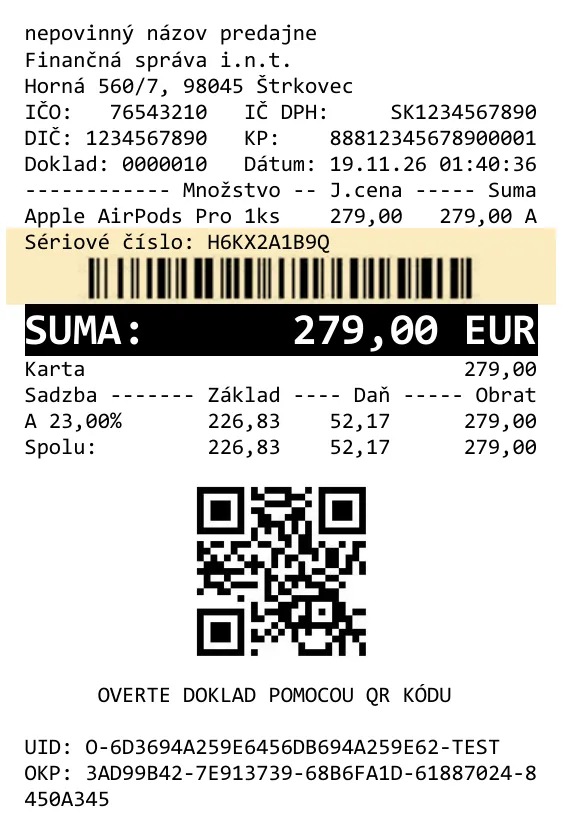
POST {server_address}/api/v1/requests/receipts/cash_register

{
  "print": {
    "printerName": "pdf"
  },
  "request": {
    "data": {
      "cashRegisterCode": "88812345678900001",
      "items": [
        {
          "type": "positive",
          "name": "Apple AirPods Pro",
          "quantity": {
            "amount": 1,
            "unit": "ks"
          },
          "unitPrice": 279.0,
          "price": 279.0,
          "vatRate": 23,
          "description": "Sériové číslo: H6KX2A1B9Q\n\u001abarcode\u001etype\u001fcode128\u001econtent\u001fH6KX2A1B9Q\u001eheight\u001f50\u001a"
        }
      ],
      "payments": [
        {
          "name": "Karta",
          "amount": 279.0
        }
      ]
    }
  }
}
Order barcode in the footer
The order number as a barcode you scan when handing over or returning goods.
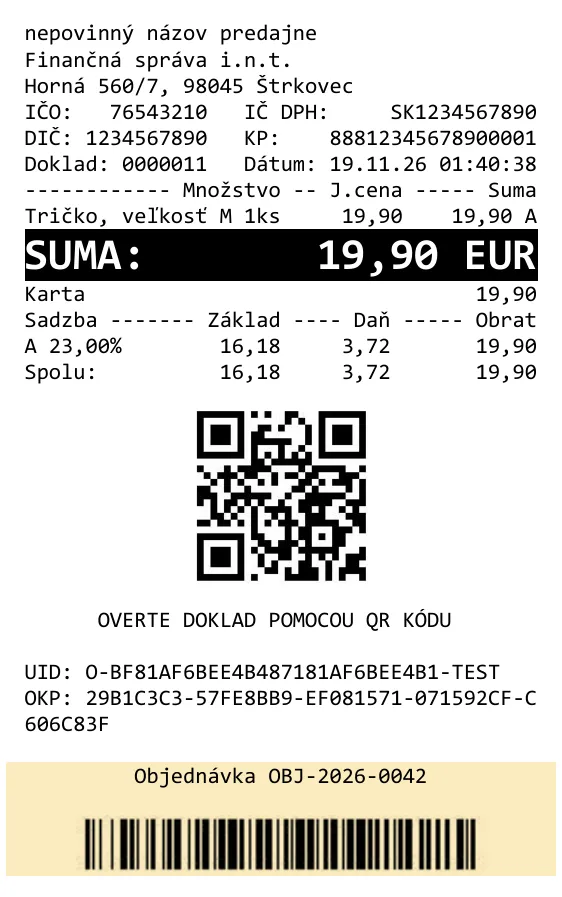
POST {server_address}/api/v1/requests/receipts/cash_register

{
  "print": {
    "printerName": "pdf"
  },
  "request": {
    "data": {
      "cashRegisterCode": "88812345678900001",
      "items": [
        {
          "type": "positive",
          "name": "Tričko, veľkosť M",
          "quantity": {
            "amount": 1,
            "unit": "ks"
          },
          "unitPrice": 19.9,
          "price": 19.9,
          "vatRate": 23
        }
      ],
      "footerText": "\u001atext\u001econtent\u001fObjednávka OBJ-2026-0042\u001ealignment\u001fcenter\u001a\n\u001abarcode\u001etype\u001fcode128\u001econtent\u001fOBJ-2026-0042\u001eheight\u001f60\u001a",
      "payments": [
        {
          "name": "Karta",
          "amount": 19.9
        }
      ]
    }
  }
}
Token not printed
| What happened | Cause |
|---|---|
| the token is missing, the text around it printed | identifier or key with different letter case (pageBreak instead of pagebreak), a required parameter (content, type) is missing or a value is invalid |
| the token and all text after it are missing | the closing SUB is missing |
| the logo is missing | the logo works only on the external printer (pos); on a terminal and in a PDF it is skipped |
| a page break in the header or item description did nothing | page breaks are ignored in the header and item description |
| the barcode is missing | height is 0 |
| printing failed with an error | invalid barcode content: wrong EAN check digit or length, diacritics in Code 128 |
If printing fails while registering a receipt, the receipt is already recorded. eKasa returns error
-502 PrintReceiptError and you need to print a
receipt copy for the customer. Check barcode content in your software
before sending the receipt.