A discount is recorded on the receipt as a separate item of type discount with a negative price. We recommend always
stating it right after the item it relates to, even when the customer got a discount on the whole purchase.
Why item and discount pairs
A customer buying for a company reads the purchase price of each item from the receipt. If each item has its discount next to it, the price after the discount is obvious. If the discounts are added up at the end of the receipt, the customer has to split them up themselves.
Recommended: the discount right below the item
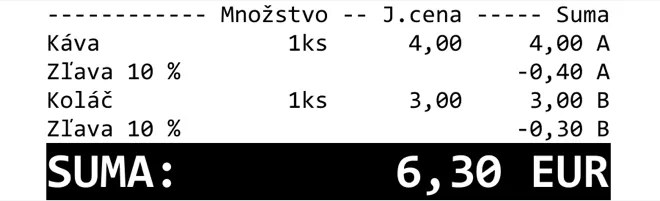
Not recommended: discounts at the end of the receipt

Rules
- A discount has the type
discount, a negativeunitPriceandprice, and a quantity of1. - A discount has the same VAT rate as the item it relates to. Discounts are given at the time of sale, so they can
only use the currently valid rates (
23,19,5,0, ornull). - The total of discounts (in absolute value) at one VAT rate must not exceed the total of the items with a positive
price at the same rate. Otherwise eKasa returns the error
Suma zliav nesmie presiahnúť sumu ostatných evidovaných položiek dokladu v rovnakej sadzbe DPH.(the total of discounts must not exceed the total of the other items recorded on the receipt at the same VAT rate).
Discount on an item
A loyalty discount of €1 on two cola drinks:
{
  "request": {
    "data": {
      "cashRegisterCode": "88812345678900001",
      "items": [
        {
          "type": "positive",
          "name": "Coca Cola",
          "quantity": { "amount": 2, "unit": "ks" },
          "unitPrice": 1.99,
          "price": 3.98,
          "vatRate": 23.00
        },
        {
          "type": "discount",
          "name": "Vernostná zľava",
          "quantity": { "amount": 1 },
          "unitPrice": -1.00,
          "price": -1.00,
          "vatRate": 23.00
        }
      ],
      "payments": [
        { "name": "Platobná karta", "amount": 2.98 }
      ]
    }
  }
}
Discount on the whole receipt
Split a discount on the whole purchase across the individual items and state each one after its item. Example: a 10% discount on a €7 purchase at two VAT rates.
{
  "request": {
    "data": {
      "cashRegisterCode": "88812345678900001",
      "items": [
        {
          "type": "positive",
          "name": "Káva",
          "quantity": { "amount": 1, "unit": "ks" },
          "unitPrice": 4.00,
          "price": 4.00,
          "vatRate": 23.00
        },
        {
          "type": "discount",
          "name": "Zľava 10 % na nákup",
          "quantity": { "amount": 1 },
          "unitPrice": -0.40,
          "price": -0.40,
          "vatRate": 23.00
        },
        {
          "type": "positive",
          "name": "Koláč",
          "quantity": { "amount": 1, "unit": "ks" },
          "unitPrice": 3.00,
          "price": 3.00,
          "vatRate": 19.00
        },
        {
          "type": "discount",
          "name": "Zľava 10 % na nákup",
          "quantity": { "amount": 1 },
          "unitPrice": -0.30,
          "price": -0.30,
          "vatRate": 19.00
        }
      ],
      "payments": [
        { "name": "Platobná karta", "amount": 6.30 }
      ]
    }
  }
}
Splitting a percentage discount can create rounding differences. Add the difference to the discount of the last item so that the discounts add up to the total discount.
You can also state the discount in aggregate, with one discount item per VAT rate at the end of the receipt. eKasa
accepts such a receipt, but the customer cannot tell the price of the individual items after the discount.
Returning discounted goods
When returning goods that were sold with a discount, return the goods with a returned item and the discount with a
positive positive item at the rate of the original discount. Details are in
Cancellations and returns and
Receipt items.