Items (items) are the goods and services on a receipt, but also discounts, returns, returnable containers and
advance deductions. The item type determines what the item means, and it drives the sign of the price, the
allowed VAT rates and whether the original receipt must be referenced.
Items can only be stated on some receipt types:
| Receipt type | Identifier | Contains items |
|---|---|---|
| Cash register receipt | CashRegister |
yes |
| Paragon | Paragon |
yes |
| Invoice | Invoice |
no |
| Invoice payment paragon | InvoiceParagon |
no |
A cash register receipt and a paragon must have at least one item and at most 500.
Item properties
Each item consists of these properties. In the .NET library (class ReceiptItem) they have the same name starting
with a capital letter (Type, UnitPrice…).
| Property | Required | Format | Meaning |
|---|---|---|---|
type |
yes | positive, discount, returned… |
item type |
name |
yes | text, at most 255 characters | name of the goods or service |
price |
yes | -10000000 to 10000000, 2 decimal places |
total price |
unitPrice |
yes | -10000000 to 10000000, 6 decimal places, sign by type |
unit price in EUR |
quantity |
yes | amount and unit |
quantity of goods or extent of service |
referenceReceiptId |
for returned and correction |
receipt ID, OKP or ERP receipt number | original receipt |
vatRate |
by item type | number, 2 decimal places, or null |
VAT rate |
specialRegulation |
no | VATReverseCharge, VATExemptionGood… |
reason for a zero rate |
seller |
no | id and type |
seller, if different from the cash register’s business |
voucherNumber |
for voucher |
text, 1 to 50 characters | single-purpose voucher number |
description |
no | text, supports tokens | additional description on the receipt |
Item type (type)
Required. An item of a positive type must have a positive unit price, an item of a negative type a negative one.
| Identifier | Name | Price | When | Conditions |
|---|---|---|---|---|
positive |
Positive item | positive | sale of goods or provision of a service | |
returnedContainer |
Returned containers | negative | bought-back deposit containers; also the return of a sold returnable container, for example when a receipt is returned | |
returned |
Returned | negative | cancellation of a recorded item after it was issued on a cash register receipt, when goods or a service are returned, for example on a complaint | not used for returnable containers |
correction |
Correction | positive or negative | negation of an item of a receipt already recorded in the eKasa system when it is corrected, for example after an operator mistake | |
discount |
Discount | negative | a discount given | the receipt must also contain a positive item (positive) at the same VAT rate that the discount relates to; the total of discounts must not exceed the total of the items with a positive price at that VAT rate |
advance |
Deducted advance | negative | the amount of an advance payment stated on the receipt issued when the remaining price for the sold goods or provided service is paid, if an advance has already been received for the goods | the receipt must also contain a positive item (positive) the advance deduction relates to |
voucher |
Voucher exchange | negative | the amount of a single-purpose voucher when it is exchanged for goods or a service, that is when a voucher bought in advance is redeemed | the receipt must also contain a positive item (positive) the voucher exchange relates to; apart from vouchers, the receipt may contain only positive items (positive) and discounts (discount) |
Returning a receipt with a returnable container
When goods are returned, for example when a whole receipt is returned, a returnable container from the original
receipt is not recorded as a returned item (returned) but as returned containers (returnedContainer):
Returned goods (returned) |
Returned container (returnedContainer) |
|
|---|---|---|
| VAT rate | required, the rate of the sale | null (the item is not subject to VAT) |
| unit price | negative | negative |
referenceReceiptId |
required | not stated |
A returned item (returned) must have a VAT rate, so it cannot be used for a returnable container. Registering such a
receipt ends with the validation error Sadzba DPH je povinná pre všetky položky okrem kladnej položky, položky zľavy,
vrátenia vratných obalov alebo opravnej položky. (the VAT rate is required for all items except a positive item, a
discount item, returned containers or a correction item).
Original receipt. A drink is sold together with a deposit on a returnable container. The deposit is a positive
item (positive) with the rate null and is printed in the Vratné obaly (returnable containers) section as a
sale:
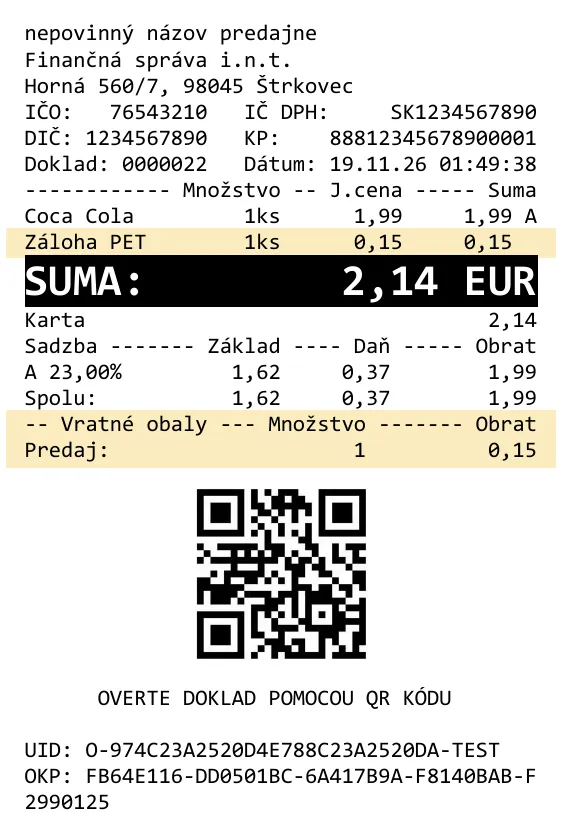
POST {server_address}/api/v1/requests/receipts/cash_register

{
  "print": {
    "printerName": "pdf"
  },
  "request": {
    "data": {
      "cashRegisterCode": "88812345678900001",
      "items": [
        {
          "type": "positive",
          "name": "Coca Cola",
          "quantity": {
            "amount": 1.00,
            "unit": "ks"
          },
          "unitPrice": 1.99,
          "price": 1.99,
          "vatRate": 23.00
        },
        {
          "type": "positive",
          "name": "Záloha PET",
          "quantity": {
            "amount": 1.00,
            "unit": "ks"
          },
          "unitPrice": 0.15,
          "price": 0.15,
          "vatRate": null
        }
      ],
      "payments": [
        {
          "name": "Karta",
          "amount": 2.14
        }
      ]
    }
  }
}
var items = new ReceiptItems
{
new ReceiptItem(ReceiptItemType.Positive, "Coca Cola", 1.99m, new Quantity(1, "ks"), 23m),
new ReceiptItem(ReceiptItemType.Positive, "Záloha PET", 0.15m, new Quantity(1, "ks"), VatRate.None),
};Return of this receipt. The drink is a returned item (returned) with a reference to the original receipt, the
deposit is returned containers (returnedContainer) without a reference:
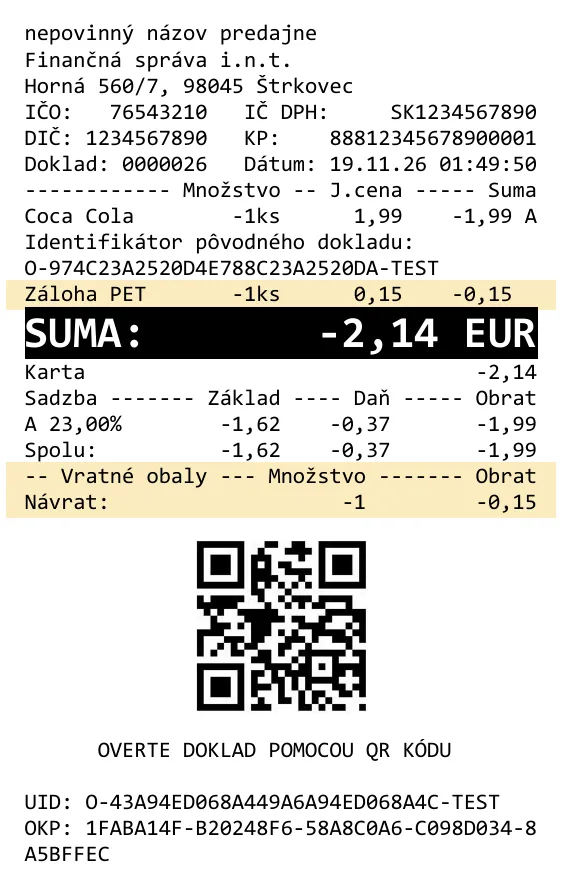
POST {server_address}/api/v1/requests/receipts/cash_register

{
  "print": {
    "printerName": "pdf"
  },
  "request": {
    "data": {
      "cashRegisterCode": "88812345678900001",
      "items": [
        {
          "type": "returned",
          "name": "Coca Cola",
          "quantity": {
            "amount": 1.00,
            "unit": "ks"
          },
          "unitPrice": -1.99,
          "price": -1.99,
          "vatRate": 23.00,
          "referenceReceiptId": "O-974C23A2520D4E788C23A2520DA-TEST"
        },
        {
          "type": "returnedContainer",
          "name": "Záloha PET",
          "quantity": {
            "amount": 1.00,
            "unit": "ks"
          },
          "unitPrice": -0.15,
          "price": -0.15,
          "vatRate": null
        }
      ],
      "payments": [
        {
          "name": "Karta",
          "amount": -2.14
        }
      ]
    }
  }
}
var items = new ReceiptItems
{
new ReceiptItem(ReceiptItemType.Returned, "Coca Cola", -1.99m, new Quantity(1, "ks"), 23m,
referenceReceiptId: "O-974C23A2520D4E788C23A2520DA-TEST"),
new ReceiptItem(ReceiptItemType.ReturnedContainer, "Záloha PET", -0.15m, new Quantity(1, "ks"), VatRate.None),
};Name (name)
Required. The name of the goods or service is a non-empty text of at most 255 characters.
Some symbols (mainly non-printable ones) are, however, forbidden by the eKasa system. More in Encoding and special characters.
Total price (price)
Required. The total price of the goods or service in the range -10000000 to 10000000, to two decimal places.
It must equal the unit price multiplied by the quantity, rounded to two decimal places (halves round up):
price = unitPrice × quantityUnit price (unitPrice)
Required. The unit price of the goods or service in EUR in the range -10000000 to 10000000, to six decimal
places. The sign depends on the item type:
| Item kind | Types | Allowed range |
|---|---|---|
| positive | positive |
0 to 10000000 |
| negative | returnedContainer, returned, discount, advance, voucher |
-10000000 to 0 |
| correction | correction |
full range -10000000 to 10000000 |
Quantity (quantity)
Required. The quantity of goods or extent of service has two fields:
| Field | Required | Values | Default |
|---|---|---|---|
amount |
yes | 0 to 10000000, four decimal places |
|
unit |
no | unit of quantity, 1 to 3 characters | x |
Reference receipt number (referenceReceiptId)
A reference to the original receipt. Required only for items of type correction or returned. For other types it
must be null (it must not be stated). This also applies to a returnedContainer item when a receipt is returned,
even though it returns a container from a specific original receipt.
| Original receipt | Reference number |
|---|---|
| registered in online mode, has a unique receipt identifier | this identifier (the response.data.id field) |
| registered in offline mode, has no unique receipt identifier | the OKP (the request.data.okp field) |
| issued by an electronic cash register (ERP, the kind of cash register used before the current eKasa legislation) | the sequence number of the cash register receipt |
VAT rate (vatRate)
A number to two decimal places, or null for an item not subject to VAT.
Valid rates by period
VAT rates used in Slovakia since the start of the eKasa project (1 April 2019):
| VAT rate | Until 31 Dec 2024 | From 1 Jan 2025 |
|---|---|---|
| standard | 20% | 23% |
| reduced | 10% | 19% and 5% |
Besides the standard and reduced rates, which can change over time, fixed values are used:
| Value | Use | .NET library |
|---|---|---|
0 |
items exempt from VAT, or recording sales of a business that is not a VAT payer | VatRate.Zero |
null |
items not subject to VAT (currently the return and sale of returnable containers) | VatRate.None |
Allowed VAT rate values
The allowed rates depend on the item type, its purpose and the date the receipt is issued (for a paragon or an
invoice payment paragon, the issueDate value applies):
| Item type | Until 31 Dec 2024 | From 1 Jan 2025 |
|---|---|---|
positive |
20, 10, 0, null |
23, 20*, 19, 10*, 5, 0, null |
discount |
20, 10, 0, null** |
23, 19, 5, 0, null** |
returnedContainer |
null |
null |
returned |
20, 10, 0 |
23, 20, 19, 10, 5, 0 |
advance |
20, 10, 0 |
23, 20, 19, 10, 5, 0 |
voucher |
20, 10, 0 |
23, 20, 19, 10, 5, 0 |
correction |
20, 10, 0, null |
23, 20, 19, 10, 5, 0, null |
* only if the receipt also contains an item of type returned (from version 7.0.1)
** from version 7.0.6
A discount (discount) is applied “in real time”, so it must use the currently valid VAT rates. From version
7.0.6, a discount on items not subject to VAT can be recorded with the rate null.
A positive item (positive) is used in various situations, each with a different set of allowed rates:
| The positive item is | Allowed rates |
|---|---|
| a sale of goods or a service | the sale happens “in real time”, so only the currently valid rates: 20, 10 and 0 before 1 January 2025, or 23, 19, 5 and 0 from 1 January 2025 |
| a sale of returnable containers | null (the item is not subject to VAT) |
| a discount refund | from version 7.0.1, historical rates in addition to the current ones; the receipt must contain at least one other item that records a return (returned) |
Use a discount refund in a positive item if the original receipt recorded a discount (discount) on a separate line
for the sold goods (positive) and you are now recording the return of these goods. The receipt combines the goods
return (returned) and the discount refund as an item of type positive, because the discount refund is recorded
as a positive value and the discount type allows only negative prices. eKasa verifies that the positive item
records a discount refund by requiring at least one returned item on the receipt.
Returnable containers (sale positive and buy-back returnedContainer) are recorded as items not subject to
VAT, so vatRate must be null (VatRate.None in the .NET library).
The other items (returned, advance, voucher, correction) can have all current and historical rates, but
always the rate of the original operation:
| Item type | Rate must be the same as for | 20% or 10% is also allowed if |
|---|---|---|
returned |
the recorded sale | the sale was before 1 January 2025 |
advance |
the recorded receipt of the advance | the advance was received before 1 January 2025 |
voucher |
the recorded sale of the single-purpose voucher | the voucher sale was recorded before 1 January 2025 |
correction |
the original item | the original item was recorded before 1 January 2025 |
If the VAT rate is incorrect, eKasa returns a validation error, for example: Sadzba DPH 23,00% nie je platná pre doklad s dátumom vyhotovenia 11. 11. 2024 (the VAT rate 23.00% is not valid for a receipt issued on 11 November 2024).
Reason for a zero rate (specialRegulation)
A flag that specifies the reason for assigning a zero tax rate, if the item was assigned one. It is optional, even for items with a zero rate.
It can only be stated for an item with the rate 0 or not subject to VAT (null), when it represents one of these
options (in the .NET library the TaxFreeReason enum):
| Value | Meaning |
|---|---|
VATReverseCharge |
reverse charge |
VATExemptionGood |
item exempt from tax |
TravelAgency |
special tax scheme for travel agencies |
UsedGood |
special tax scheme for second-hand goods |
Artwork |
special tax scheme for works of art |
CollectiblesAndAntiques |
special tax scheme for collectors’ items and antiques |
Seller (seller)
Optional. Stated only if the seller on whose behalf the goods were sold or the service provided is different from the business assigned to the online cash register.
| Field | Required | Values |
|---|---|---|
id |
yes | identifier of the seller on whose behalf the goods were sold or the service provided |
type |
yes | type of the identifier, see the table below |
type |
Identifier | Format of id |
|---|---|---|
DIC |
DIČ (tax identification number) | ^[0-9]{10}$, exactly 10 digits |
ICDPH |
IČ DPH (VAT identification number) | ^SK[0-9]{8,10}$, the letters SK followed by 8 to 10 digits; a bare 10-digit DIČ is also accepted |
Voucher number (voucherNumber)
The number of a single-purpose voucher when it is exchanged for goods or a service. Text 1 to 50 characters long.
| Item type | voucherNumber |
|---|---|
voucher |
required |
correction |
may be stated |
| others | must be null |
Item description (description)
An optional additional description printed on the receipt right after the product name and the quantity and price information. Use it, for example, for the expiry date or the product serial number. It is not sent to the eKasa system of the Financial Administration.
The description supports tokens for formatting and printing QR codes and barcodes, see Tokens and text formatting, for example a serial number as a barcode.