The receipt type determines the situation in which the receipt is issued and which data it must contain. Most sales are a cash register receipt. The other types cover a cash register outage (paragon) and invoice payments.
flowchart TD
    A{Is the customer<br/>paying an invoice?} -->|no, regular sale| B{Was the cash register<br/>working at the time of sale?}
    B -->|yes| C[Cash register receipt]
    B -->|no, recorded later| D[Paragon]
    A -->|yes| E{Was the cash register<br/>working at the time of payment?}
    E -->|yes| F[Invoice payment]
    E -->|no, recorded later| G[Invoice payment<br/>paragon]
Cash register receipt
A regular cash register receipt, issued for a sale, or when goods are returned or a receipt is cancelled.
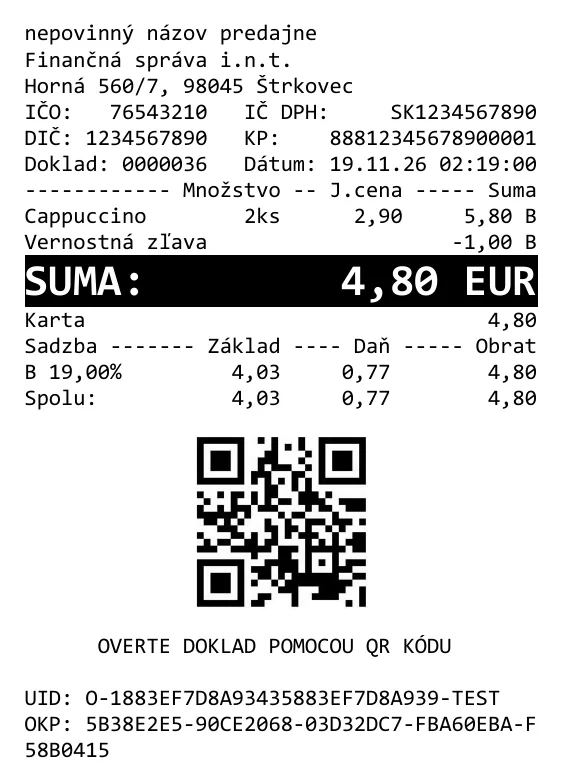
POST {server_address}/api/v1/requests/receipts/cash_register

{
  "print": {
    "printerName": "pdf"
  },
  "request": {
    "data": {
      "cashRegisterCode": "88812345678900001",
      "items": [
        {
          "type": "positive",
          "name": "Cappuccino",
          "quantity": {
            "amount": 2.0,
            "unit": "ks"
          },
          "unitPrice": 2.9,
          "price": 5.8,
          "vatRate": 19.0
        },
        {
          "type": "discount",
          "name": "Vernostná zľava",
          "quantity": {
            "amount": 1.0
          },
          "unitPrice": -1.0,
          "price": -1.0,
          "vatRate": 19.0
        }
      ],
      "payments": [
        {
          "name": "Karta",
          "amount": 4.8
        }
      ]
    }
  }
}
Method: client.RegisterReceiptAsync(RegisterCashRegisterReceiptRequest, RegisterReceiptPrintContext, CancellationToken)
Cash register receipt - paragon
When the cash register is out of order, staff write paper receipts for customers, called paragons. Once operation is restored, they must record them in the cash register within ten days at the latest (§ 11(3) of Act No. 384/2025 Coll.).
An internet outage is not a failure: a cash register with a CHDÚ storage, which eKasa creates, keeps issuing receipts and records them in offline mode, sending them once the connection is back. The law requires paragons during an internet outage only for software and virtual cash registers (§ 11(1)), which this documentation does not cover.
Your software therefore needs a form where staff enter, along with the items, these values from the paragon:
issueDate: date and time the paragon was issued (T),paragonNumber: paragon number (P).
The other data are the same as for a cash register receipt.
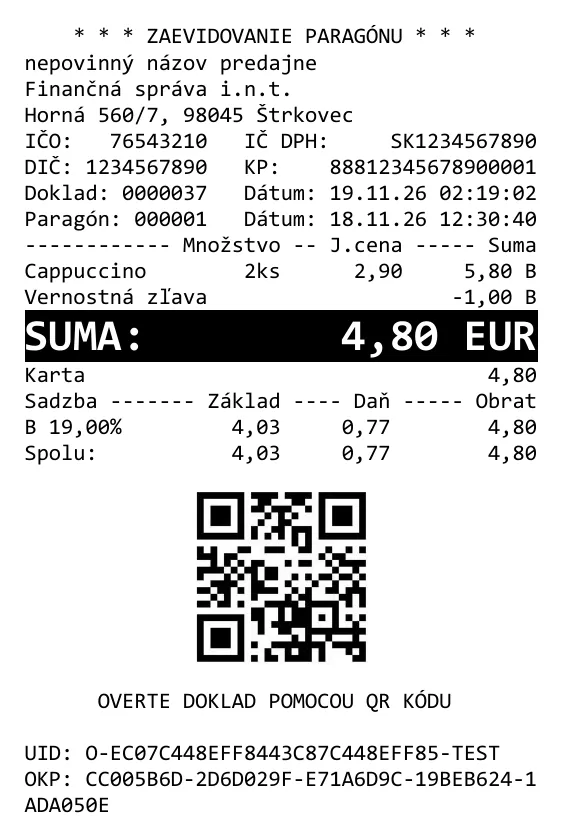
POST {server_address}/api/v1/requests/receipts/paragon

{
  "print": {
    "printerName": "pdf"
  },
  "request": {
    "data": {
      "cashRegisterCode": "88812345678900001",
      "issueDate": "2026-11-18T12:30:40+01:00",
      "paragonNumber": 1,
      "items": [
        {
          "type": "positive",
          "name": "Cappuccino",
          "quantity": {
            "amount": 2.0,
            "unit": "ks"
          },
          "unitPrice": 2.9,
          "price": 5.8,
          "vatRate": 19.0
        },
        {
          "type": "discount",
          "name": "Vernostná zľava",
          "quantity": {
            "amount": 1.0
          },
          "unitPrice": -1.0,
          "price": -1.0,
          "vatRate": 19.0
        }
      ],
      "payments": [
        {
          "name": "Karta",
          "amount": 4.8
        }
      ]
    }
  }
}
Method: client.RegisterReceiptAsync(RegisterParagonReceiptRequest, RegisterReceiptPrintContext, CancellationToken)
Invoice payment
The business issues the invoice outside eKasa, for example in accounting software. When the customer comes to the point of sale to pay it, the business records the payment as an invoice payment.
An invoice payment receipt has no items (items). Staff enter:
invoiceNumber: the invoice number,amount: the amount paid including VAT, that is the whole invoice amount or only part of it if the customer pays in instalments.
If the customer pays in cash, put the amount before rounding in amount and the rounding in the roundingAmount
property (see Rounding).
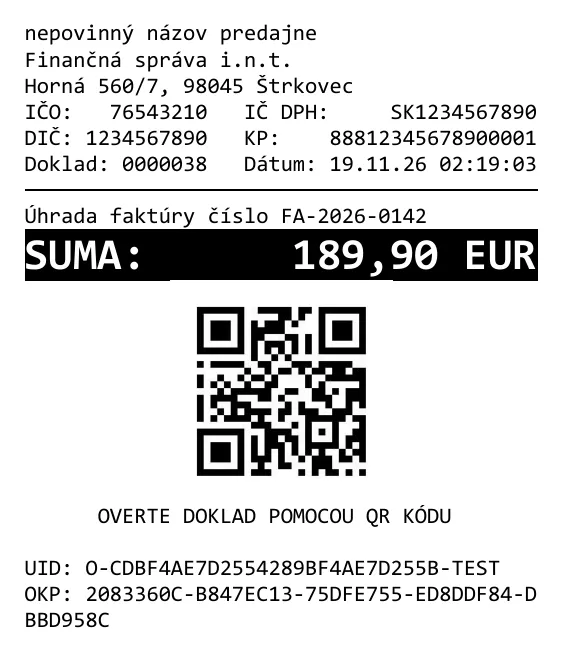
POST {server_address}/api/v1/requests/receipts/invoice

{
  "print": {
    "printerName": "pdf"
  },
  "request": {
    "data": {
      "cashRegisterCode": "88812345678900001",
      "invoiceNumber": "FA-2026-0142",
      "amount": 189.9
    }
  }
}
Method: client.RegisterReceiptAsync(RegisterInvoiceReceiptRequest, RegisterReceiptPrintContext, CancellationToken)
Invoice payment - paragon
A combination of both previous cases: the customer pays an invoice while the cash register is out of order. Staff write them a paragon and, once the fault is fixed, record it as an invoice payment.
The receipt has no items (items). Staff enter:
issueDate: date and time the paragon was issued (T),paragonNumber: paragon number (P),invoiceNumber: the invoice number,amount: the amount paid including VAT (the whole invoice amount or part of it)
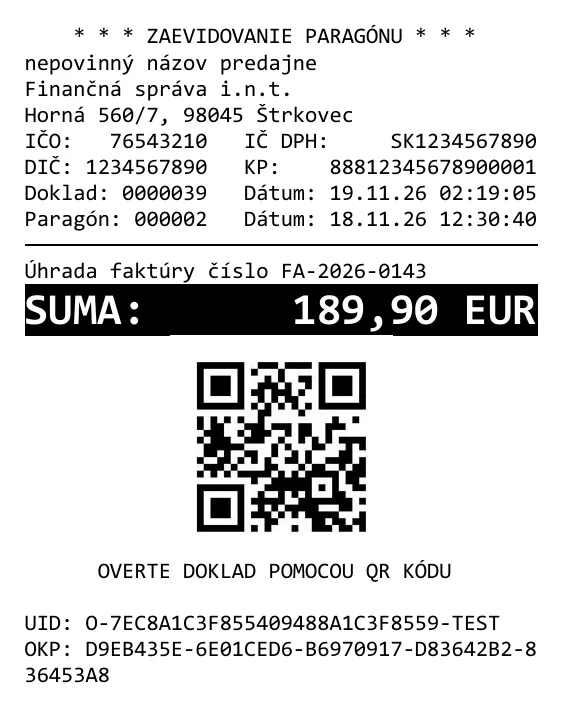
POST {server_address}/api/v1/requests/receipts/invoice_paragon

{
  "print": {
    "printerName": "pdf"
  },
  "request": {
    "data": {
      "cashRegisterCode": "88812345678900001",
      "issueDate": "2026-11-18T12:30:40+01:00",
      "invoiceNumber": "FA-2026-0143",
      "paragonNumber": 2,
      "amount": 189.9
    }
  }
}
Method: client.RegisterReceiptAsync(RegisterInvoiceParagonReceiptRequest, RegisterReceiptPrintContext, CancellationToken)